If you run a company in Oxford, security flaws risk customer data Oxford businesses collect every day through websites, contact forms, booking pages, ecommerce checkout pages, and customer accounts. Many local businesses focus on design, SEO, and lead generation, but forget that weak website security can damage customer trust very quickly.
Oxford has a strong local business market, with professional service firms, clinics, education businesses, ecommerce brands, hospitality companies, and local service providers all competing online. Customers expect your website to be safe, fast, and reliable. If your website has security flaws, private customer details may be exposed.
A security problem can hurt your brand, reduce enquiries, and create serious business risk. That is why Oxford businesses should check their website security before a small issue becomes a bigger problem.
Is Your Website Putting Customer Data at Risk?
Weak logins, outdated plugins, insecure forms and poor hosting can damage trust, leads and customer confidence.
Best for: Oxford businesses that collect leads, bookings, payments or customer details online.
Why Customer Data Security Matters for Oxford Businesses
Customer data security is not only a technical issue. It is a trust issue. When people fill out a contact form, book a service, create an account, or buy something online, they expect their personal details to stay safe.
This data may include names, emails, phone numbers, addresses, payment details, business messages, and service requests. If your website does not protect this information, customers may lose confidence in your business.
Customer Trust and Local Brand Reputation
Oxford businesses often rely on local reputation. A customer may choose your business because of reviews, referrals, Google search results, or your website.
If your website looks unsafe or has visible issues, visitors may leave before contacting you. Even small signs, such as browser security warnings, broken forms, or outdated pages, can make customers doubt your brand.
A secure website helps your business look professional. It also gives visitors more confidence to call, submit a form, or make a purchase.
How Security Issues Can Damage Leads and Sales
Security problems can directly affect leads and sales. If your contact form is not secure, users may avoid submitting their details. If your checkout page looks risky, customers may abandon their purchase.
Security flaws can also affect website performance. Malware, spam links, outdated plugins, and hacked files can slow down your site or damage your Google visibility.
For Oxford businesses, this can mean fewer enquiries, lost bookings, lower conversions, and weaker online trust.
Quick Warning for Oxford Businesses
If your website collects customer data, it must be secure. Contact forms, login pages, checkout pages and booking forms should be protected before a small issue becomes a serious business risk.
5 Critical Security Flaws That Risk Your Customer Data
Many website security problems start small. But if they are ignored, they can create serious risks for customer data and business reputation.
1. Weak Login Systems and Poor Password Protection
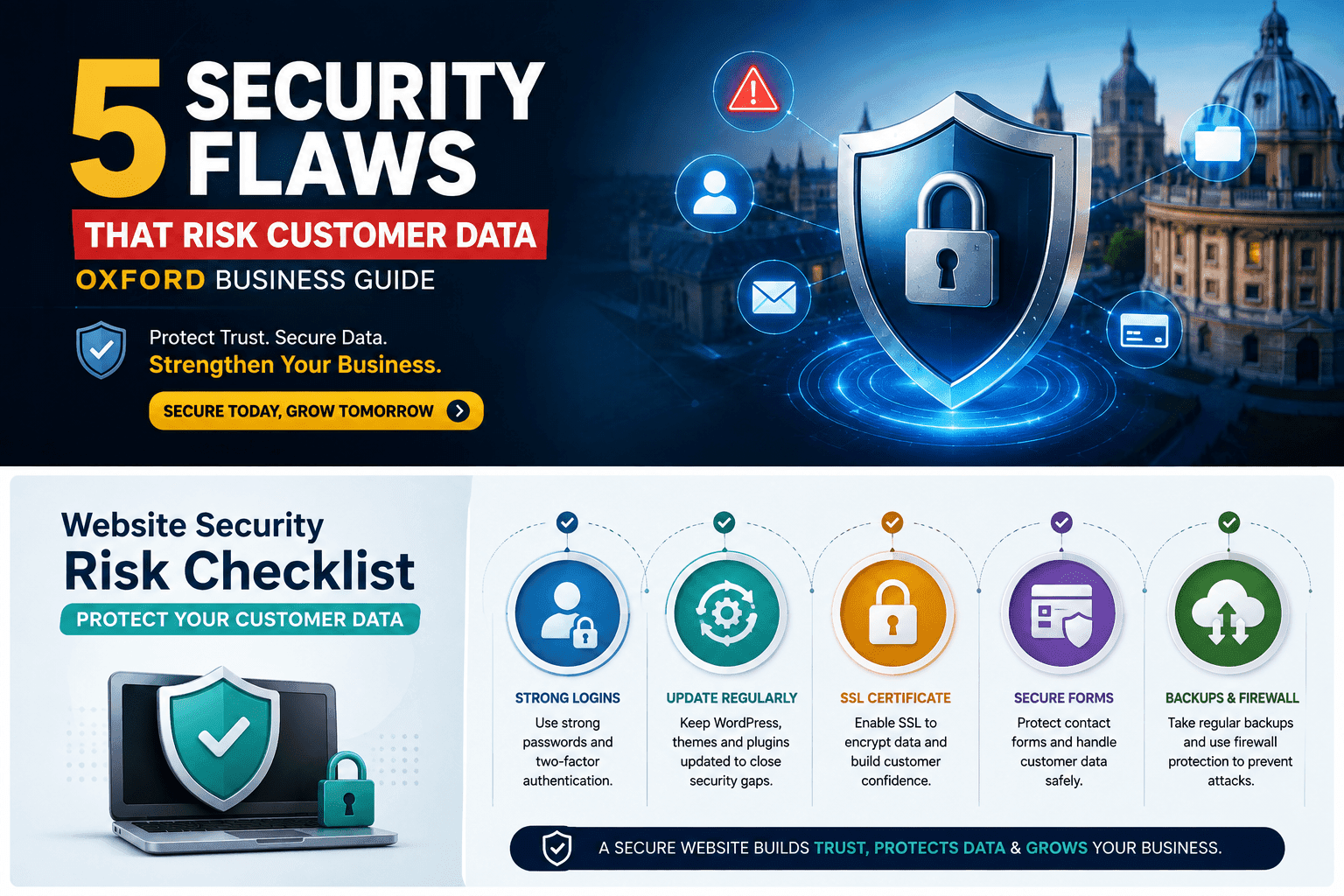
Weak login systems are one of the most common website security flaws. If your admin passwords are easy to guess, reused, or shared between team members, attackers may gain access to your website.
Common login risks include:
- Weak passwords
- No two-factor authentication
- Shared admin accounts
- Too many users with admin access
- No login attempt limits
- Old user accounts that are no longer needed
A stronger login setup can reduce risk. Oxford businesses should use strong passwords, remove unused accounts, limit admin access, and add two-factor authentication where possible.
2. Outdated WordPress Plugins, Themes and Software
Outdated plugins, themes, and website software can create security gaps. Many business websites use WordPress, and WordPress can be secure when it is maintained properly. The problem starts when updates are ignored.
Old plugins may contain known security issues. Outdated themes may use weak code. Older website versions may not have important security fixes.
This is one of the most common WordPress security flaws UK businesses face.
To reduce risk, businesses should:
- Update plugins regularly
- Update themes carefully
- Keep WordPress core updated
- Remove unused plugins
- Avoid nulled or cracked themes
- Check compatibility before updates
A well-maintained website is harder to exploit and easier to protect.
3. No SSL Certificate or Poor Website Encryption
An SSL certificate helps protect information passed between the visitor and your website. It also shows the secure padlock icon in the browser.
If your website does not use SSL, visitors may see a warning that the site is not secure. This can reduce trust and stop users from submitting forms or buying online.
Poor website encryption can be a serious issue for businesses that collect customer data. Contact forms, login pages, checkout pages, and booking forms should all be protected.
An SSL certificate is a basic security requirement for a modern business website.
4. Insecure Contact Forms and Customer Data Handling
Many Oxford business websites collect leads through contact forms. These forms may ask for names, emails, phone numbers, project details, appointment requests, or private messages.
If forms are not protected, spam bots, attackers, or weak form settings can create problems. Poor data handling can also increase risk if form submissions are stored without proper control.
Common form security issues include:
- No spam protection
- No secure submission process
- Storing sensitive data for too long
- Sending data to the wrong email
- Weak form plugins
- No privacy notice near forms
Secure contact forms should be simple, protected, and properly tested. Businesses should also review what data they collect and why they need it.
5. Poor Hosting Security and Missing Backups
Website hosting plays a big role in security. If your hosting is weak, outdated, or poorly managed, your website may become easier to attack.
Poor hosting can lead to malware, downtime, slow loading, file changes, or weak server protection. Missing backups can make the problem worse because you may not be able to restore your site quickly after an issue.
Oxford businesses should use reliable hosting with strong security, regular backups, malware scanning, and fast support.
Backups are very important. If your website is hacked or broken, a clean backup can help restore your site faster and reduce business disruption.
High-Risk Areas
Login pages, contact forms, checkout pages, booking forms and admin dashboards.
Business Impact
Lost trust, fewer leads, weaker conversions, downtime and damaged brand reputation.
Best Fix
Run a website security audit before the issue becomes serious.
How Oxford Businesses Can Reduce Website Security Risks
Website security should be checked regularly. It is not something you fix once and forget. A safe website needs updates, monitoring, backups, and testing.
Run a Website Security Audit
A website security audit helps find weak points before they become serious problems. It can check login security, plugins, themes, hosting, forms, SSL setup, malware risks, and user access.
A good website security audit Oxford businesses can use should review both the technical side and the user experience side. The goal is to find risks that could damage customer trust or expose private information.
Update Plugins, Themes and Core Software
Regular updates help close security gaps. But updates should be handled carefully, especially on business websites.
Before updating, it is best to take a backup and test important pages. This includes forms, checkout pages, booking systems, menus, and mobile layout.
Updating safely can protect your website without breaking important features.
Use Secure Forms, Backups and Firewall Protection
Secure forms help protect customer submissions. Backups help restore your website if something goes wrong. Firewall protection helps block suspicious traffic and attacks.
A stronger security setup may include:
- Secure contact forms
- Two-factor authentication
- Regular backups
- Malware scanning
- Website firewall protection
- SSL certificate
- Plugin cleanup
- Admin access review
These steps can reduce risk and make your website more reliable.
Website Security Checklist
- Check SSL certificate and secure forms
- Update WordPress plugins, themes and software
- Remove unused admin accounts and plugins
- Enable backups, malware scanning and firewall protection
- Test forms, checkout pages and login security
Looking for Professional Website Security Help in Oxford?
Website security can be difficult for busy business owners. You may not know which plugin is risky, which file is infected, or why your website is showing warnings.
That is where professional help can save time and reduce risk.
How Genosys Limited Can Help
Genosys Limited helps businesses improve website security, performance, and reliability. Our team can support Oxford businesses with website audits, WordPress security checks, plugin cleanup, SSL setup, secure contact forms, backups, firewall setup, malware checks, and technical website improvements.
If your website collects customer data, it should be checked properly. A secure website can help protect trust, improve user confidence, and support better conversions.
Genosys Limited can provide a Free Website Security & Performance Consultation to help you understand what needs to be fixed before your website security issues become serious.
Protect Your Customer Data Before It Is Too Late
Genosys Limited can help Oxford businesses audit security flaws, fix WordPress risks, secure forms, improve backups and strengthen website protection.
FAQs
What are common security flaws that risk customer data?
Common flaws include weak passwords, outdated plugins, missing SSL certificates, insecure contact forms, poor hosting, missing backups, and weak admin access control.
How can Oxford businesses protect customer data?
Oxford businesses can protect customer data by using SSL, secure forms, strong passwords, two-factor authentication, regular updates, backups, malware scanning, and firewall protection.
Can outdated plugins cause data breaches?
Yes, outdated plugins can create security gaps. If attackers know about a weakness in an old plugin, they may use it to access or damage a website.
Do small businesses need website security audits?
Yes. Small businesses also collect customer data through forms, bookings, accounts, and payments. A website security audit can help find risks before they damage trust or leads.
Conclusion
Security flaws can risk customer data, damage trust, and reduce leads for Oxford businesses. Weak logins, outdated plugins, missing SSL, insecure forms, poor hosting, and missing backups can all create serious problems.
The best approach is to check your website early, fix weak areas, and keep your site updated. A secure website helps customers feel safe and helps your business look professional.
If you want to protect your customer data and improve website security, Genosys Limited can help with a complete security audit, performance review, and technical website support.